
"I Deleted 1,000,000 Files From an S3 Bucket. My AWS Bill Didn't Change."
You think you deleted those files. AWS knows you didn't. Here's what's actually happening under the hood — and how to fix it without blowing your API budget.
Author: Javad Zeynal | April 01, 2026
Author: Javad Zeynal | April 01, 2026
Abstract
A routine cost review on a large data pipeline with sensor data landing in S3, (millions of objects) turned up something that shouldn't have surprised me but did: a cleanup job had "deleted" roughly 1,000,000 objects from a versioned bucket. The job completed without errors. The objects vanished from the console. The next invoice arrived with storage costs unchanged.This is one of those S3 behaviors that catches teams off guard over and over again. It deserves a thorough walkthrough: what actually happens when you delete objects from a versioned bucket, why the common remedies fall short, and what it takes to truly reclaim that storage.
The Problem: Delete Doesn't Mean Delete
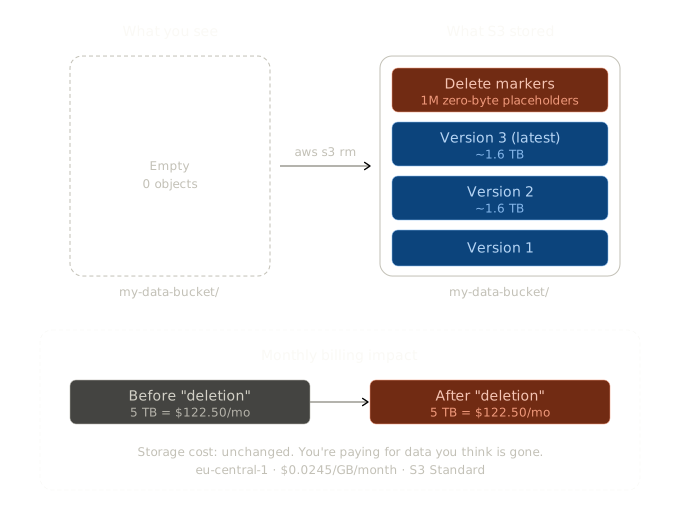
When versioning is enabled on an S3 bucket, a DELETE request does not remove the object. Instead, it inserts a delete marker - a zero-byte placeholder that tells S3 to behave as though the object no longer exists. The actual object data, across all of its versions, remains in the bucket. It is still stored, and it is still billed.
This is by design. Versioning exists to support recovery of accidentally deleted data, which is valuable for compliance, audit trails, and disaster recovery. The problem is that many teams enable versioning because a Terraform module or an AWS best-practice guide recommended it, without fully understanding the billing implications.
Here is where the math gets uncomfortable:
Consider 1,000,000 objects averaging 5 MB each - roughly 5 TB of storage. At S3 Standard pricing in eu-central-1 (0.0245$/GB/month), that's approximately 122.50$/month. After "deleting" all of them, storage costs remain $122.50/month. The deletion only added 1,000,000 delete markers on top - negligible in size, but they still count as objects for request pricing purposes.
There is a secondary cost here that is easy to miss: those delete markers are not inert. Every delete marker creation is a write request billed at the standard PUT rate. One million "deletes" generating one million delete markers means one million write requests — roughly 5$ at the standard 0.0054$ per 1,000 PUT requests in eu-central-1. More importantly, accumulated delete markers also count against the 5,500 GET requests-per-second per-prefix limit when listing objects. Buckets with millions of stale delete markers can experience dramatically slower listing operations, creating a compounding operational tax on top of the storage cost.
At production scale, this compounds fast. A 12 TB accumulation of noncurrent versions across several buckets - not uncommon in organizations with active data pipelines - amounts to roughly 294$/month, or over 3,500$/year, for data that everyone assumes is gone.
Why Most Teams Don't Notice
The AWS Console shares some blame here. When listing objects in a versioned bucket, the default view hides noncurrent versions and delete markers. The "Show versions" toggle must be explicitly enabled to reveal the full picture. Most operators never flip it.
The CLI behaves the same way. Running aws s3 ls shows the current view, which after deletion looks clean - empty, as expected. Seeing the underlying reality requires the more specific aws s3api list-object-versions command.
CloudWatch storage metrics report total bucket size, including all noncurrent versions. But unless someone is cross-referencing that number against what the bucket should contain, the discrepancy goes unnoticed. It just reads as "yes, that's our storage footprint."
The realization typically arrives during a cost optimization sprint, or when someone enables S3 Storage Lens and sees a bucket that should be nearly empty sitting at multiple terabytes.
Why Lifecycle Rules Don't Fully Solve This
Lifecycle rules are the first thing every team reaches for. They help, but they do not do what most people expect.
NoncurrentVersionExpiration
A lifecycle rule with NoncurrentVersionExpiration automatically removes noncurrent versions after a specified number of days. On the surface, this sounds like the answer.
The limitation: it applies to all noncurrent versions within the rule's scope (bucket or prefix). There is no way to restrict it to "only clean up versions for objects that have delete markers." It treats every noncurrent version identically — whether it became noncurrent because a newer version replaced it, or because someone issued a delete. For workloads that need version history on some objects (configuration files, state files, critical documents) while wanting true deletion for bulk data, this rule is too blunt an instrument.
ExpiredObjectDeleteMarker
There is a lifecycle option called ExpiredObjectDeleteMarker that sounds promising. It removes delete markers that have become "expired," meaning all underlying versions of that object have already been removed.
The critical distinction: this rule only cleans up orphaned delete markers. It does not trigger deletion of the versions underneath them. It is useful for tidying up after all versions have been removed through other means, but it does nothing about the core problem.
Multiple blog posts and even portions of AWS documentation imply that lifecycle rules represent a complete solution here. For workloads requiring any selectivity, they are not.
The Actual Fix: Scripted Purge
To truly delete objects that carry delete markers - removing every version and the markers themselves — a scripted approach is necessary.
The Naive Approach and Why It Doesn't Scale
The intuitive workflow looks like this: list all delete markers, then for each key, issue a separate ListObjectVersions call to find all its versions, then batch-delete them. This works for small buckets, but it hides a serious cost problem.
Each per-key ListObjectVersions call is billed as a LIST request at 0.0054$ per 1,000 requests in eu-central-1. For 1,000,000 keys, that is 1,000,000 API calls costing roughly 5,400$ in listing fees alone - before a single object is actually deleted. At that point, the cleanup costs more than several months of the storage it is trying to reclaim.
The Prefix-Scan Approach
The fix is to avoid per-key listing entirely. Instead, scan all versions under a shared prefix in a single paginated pass and group them in memory by key. For workloads where keys share common prefixes (which covers most real-world S3 usage - data/raw/2024/,events/,uploads/), this collapses millions of per-key calls into a few thousand paginated scans.
The workflow becomes:
A few implementation notes worth calling out:
Memory is the tradeoff. The prefix-scan approach loads version metadata into memory. For 1,000,000 keys with an average of three versions each, expect roughly 300-500 MB of memory usage. For buckets with tens of millions of versions under a single prefix, break the work into sub-prefixes (e.g., scan data/raw/2024-01/, then data/raw/2024-02/, etc.).
Throttling is real. S3 enforces per-prefix rate limits of 3,500 PUT/DELETE and 5,500 GET requests per second. At 1M+ objects, expect to hit these limits. The exponential backoff in the script is not optional.
For very large buckets (tens of millions of objects), consider using S3 Inventory as the source of truth instead of live listing. It is both cheaper and faster. More on this below.
The Cost of Cleanup
The cleanup itself is not free, and this is the part that rarely gets discussed.
In eu-central-1:
ListObjectVersions: 0.0054$ per 1,000 requests
DeleteObjects: 0.0054$ per 1,000 requests
For 1,000,000 deleted objects with an average of three versions each, here is how the two approaches compare:
Naive per-key listing
Prefix-scan grouping
The difference is staggering: 5,400$ versus 32$ for the same cleanup job. The naive approach costs more than the annual storage bill for the data it is removing. The prefix-scan approach costs less than a single month of storing those objects.
This is why the script above uses a single-pass scan. At small scale (a few thousand keys), the difference barely matters. At 1,000,000 keys, it is the difference between a reasonable cleanup and a cleanup that requires its own cost approval.
For truly large-scale cleanups involving tens of millions of objects, S3 Batch Operations combined with S3 Inventory is the better path. The inventory report costs a fraction of live listing, and Batch Operations handles deletions efficiently at scale.
Prevention: Design Your Buckets Smarter
The best cleanup is the one that never needs to run.
Separate buckets by retention requirements. Ephemeral processing data and long-term compliance archives should not coexist in the same versioned bucket. Processing data belongs in a bucket with aggressive lifecycle rules or no versioning at all. Compliance data gets versioning with carefully scoped retention policies.
Use prefix-based lifecycle rules. When a single bucket is unavoidable, organize objects by prefix and apply different lifecycle rules per prefix. A raw/prefix might get 7-day noncurrent expiration, while archive/ gets 365 days. This is far more manageable than a single policy applied to everything.
Disable versioning where it adds no value. Teams routinely leave versioning enabled on buckets storing temporary processing artifacts, CI/CD caches, or log exports. The question to ask: if this data were lost, would anyone notice? If the answer is no, versioning is just burning money.
Enable S3 Storage Lens. Configure it once, review it monthly. It surfaces noncurrent version bytes per bucket, which is the fastest way to identify the problem before it compounds into real cost.
The Missing Lifecycle Action
AWS should offer a native lifecycle action - something like PurgeDeletedObjects - that automatically removes all versions of objects carrying delete markers older than N days. The semantics are clean: "if I deleted it more than 30 days ago, I meant it. Remove everything."
This would fill the gap between NoncurrentVersionExpiration (too broad - hits all noncurrent versions regardless of cause) and ExpiredObjectDeleteMarker (too narrow - only removes orphaned markers after the real work is already done). The current situation forces every team to build and maintain custom cleanup scripts, resulting in thousands of slightly different - and sometimes buggy - purge jobs running across AWS infrastructure.
The absence of this feature creates what is effectively a versioning tax: teams that want the safety benefits of versioning must either accept unbounded storage growth for "deleted" data, implement blunt lifecycle rules that sacrifice version history across the board, or build and maintain custom purge tooling. This tax is significant enough that some teams disable versioning entirely to avoid it - which means giving up a genuinely important safety feature because the deletion semantics are incomplete.
This has been a recurring request in AWS forums for years. It remains the obvious missing middle ground.
Go Check Your Buckets
If versioned S3 buckets are part of the infrastructure and objects have been "deleted" through normal means - application code, the console, aws s3 rm - there is a good chance noncurrent versions are accumulating right now.
Run this and check:
aws s3api list-object-versions \ --bucket TEST_BUCKET \ --query 'DeleteMarkers[?IsLatest==`true`] | length(@)' \ --output text
If that number is a surprise, there is work to do.
[ Sources ]
S3 Versioning & Deletion: Using versioning in S3 buckets ·Working with delete markers·Deleting object versions
Lifecycle Management: Managing your storage lifecycle·NoncurrentVersionExpiration & ExpiredObjectDeleteMarker
Cost & Performance: Amazon S3 pricing·Request rate and performance optimization
Tooling: S3 Batch Operations·S3 Inventory·S3 Storage Lens·Boto3 — delete_objects
When versioning is enabled on an S3 bucket, a DELETE request does not remove the object. Instead, it inserts a delete marker - a zero-byte placeholder that tells S3 to behave as though the object no longer exists. The actual object data, across all of its versions, remains in the bucket. It is still stored, and it is still billed.
This is by design. Versioning exists to support recovery of accidentally deleted data, which is valuable for compliance, audit trails, and disaster recovery. The problem is that many teams enable versioning because a Terraform module or an AWS best-practice guide recommended it, without fully understanding the billing implications.
Here is where the math gets uncomfortable:
Consider 1,000,000 objects averaging 5 MB each - roughly 5 TB of storage. At S3 Standard pricing in eu-central-1 (0.0245$/GB/month), that's approximately 122.50$/month. After "deleting" all of them, storage costs remain $122.50/month. The deletion only added 1,000,000 delete markers on top - negligible in size, but they still count as objects for request pricing purposes.
There is a secondary cost here that is easy to miss: those delete markers are not inert. Every delete marker creation is a write request billed at the standard PUT rate. One million "deletes" generating one million delete markers means one million write requests — roughly 5$ at the standard 0.0054$ per 1,000 PUT requests in eu-central-1. More importantly, accumulated delete markers also count against the 5,500 GET requests-per-second per-prefix limit when listing objects. Buckets with millions of stale delete markers can experience dramatically slower listing operations, creating a compounding operational tax on top of the storage cost.
At production scale, this compounds fast. A 12 TB accumulation of noncurrent versions across several buckets - not uncommon in organizations with active data pipelines - amounts to roughly 294$/month, or over 3,500$/year, for data that everyone assumes is gone.
Why Most Teams Don't Notice
The AWS Console shares some blame here. When listing objects in a versioned bucket, the default view hides noncurrent versions and delete markers. The "Show versions" toggle must be explicitly enabled to reveal the full picture. Most operators never flip it.
The CLI behaves the same way. Running aws s3 ls shows the current view, which after deletion looks clean - empty, as expected. Seeing the underlying reality requires the more specific aws s3api list-object-versions command.
CloudWatch storage metrics report total bucket size, including all noncurrent versions. But unless someone is cross-referencing that number against what the bucket should contain, the discrepancy goes unnoticed. It just reads as "yes, that's our storage footprint."
The realization typically arrives during a cost optimization sprint, or when someone enables S3 Storage Lens and sees a bucket that should be nearly empty sitting at multiple terabytes.
Why Lifecycle Rules Don't Fully Solve This
Lifecycle rules are the first thing every team reaches for. They help, but they do not do what most people expect.
NoncurrentVersionExpiration
A lifecycle rule with NoncurrentVersionExpiration automatically removes noncurrent versions after a specified number of days. On the surface, this sounds like the answer.
The limitation: it applies to all noncurrent versions within the rule's scope (bucket or prefix). There is no way to restrict it to "only clean up versions for objects that have delete markers." It treats every noncurrent version identically — whether it became noncurrent because a newer version replaced it, or because someone issued a delete. For workloads that need version history on some objects (configuration files, state files, critical documents) while wanting true deletion for bulk data, this rule is too blunt an instrument.
ExpiredObjectDeleteMarker
There is a lifecycle option called ExpiredObjectDeleteMarker that sounds promising. It removes delete markers that have become "expired," meaning all underlying versions of that object have already been removed.
The critical distinction: this rule only cleans up orphaned delete markers. It does not trigger deletion of the versions underneath them. It is useful for tidying up after all versions have been removed through other means, but it does nothing about the core problem.
Multiple blog posts and even portions of AWS documentation imply that lifecycle rules represent a complete solution here. For workloads requiring any selectivity, they are not.
The Actual Fix: Scripted Purge
To truly delete objects that carry delete markers - removing every version and the markers themselves — a scripted approach is necessary.
The Naive Approach and Why It Doesn't Scale
The intuitive workflow looks like this: list all delete markers, then for each key, issue a separate ListObjectVersions call to find all its versions, then batch-delete them. This works for small buckets, but it hides a serious cost problem.
Each per-key ListObjectVersions call is billed as a LIST request at 0.0054$ per 1,000 requests in eu-central-1. For 1,000,000 keys, that is 1,000,000 API calls costing roughly 5,400$ in listing fees alone - before a single object is actually deleted. At that point, the cleanup costs more than several months of the storage it is trying to reclaim.
The Prefix-Scan Approach
The fix is to avoid per-key listing entirely. Instead, scan all versions under a shared prefix in a single paginated pass and group them in memory by key. For workloads where keys share common prefixes (which covers most real-world S3 usage - data/raw/2024/,events/,uploads/), this collapses millions of per-key calls into a few thousand paginated scans.
The workflow becomes:
- Scan all versions and delete markers under the target prefix in a single paginated pass
- Identify which keys have a current delete marker (i.e., were "deleted")
- Collect all versions belonging to those keys
- Batch-delete everything in chunks of 1,000
- Handle throttling and retries
A few implementation notes worth calling out:
Memory is the tradeoff. The prefix-scan approach loads version metadata into memory. For 1,000,000 keys with an average of three versions each, expect roughly 300-500 MB of memory usage. For buckets with tens of millions of versions under a single prefix, break the work into sub-prefixes (e.g., scan data/raw/2024-01/, then data/raw/2024-02/, etc.).
Throttling is real. S3 enforces per-prefix rate limits of 3,500 PUT/DELETE and 5,500 GET requests per second. At 1M+ objects, expect to hit these limits. The exponential backoff in the script is not optional.
For very large buckets (tens of millions of objects), consider using S3 Inventory as the source of truth instead of live listing. It is both cheaper and faster. More on this below.
The Cost of Cleanup
The cleanup itself is not free, and this is the part that rarely gets discussed.
In eu-central-1:
ListObjectVersions: 0.0054$ per 1,000 requests
DeleteObjects: 0.0054$ per 1,000 requests
For 1,000,000 deleted objects with an average of three versions each, here is how the two approaches compare:
Naive per-key listing
Operation | Approximate Calls | Cost |
List delete markers | ~1,000 | ~5,40$ |
List versions per key | ~1000,000 | ~5,400$ |
Batch Delete | ~3000 | ~16,20$ |
Total | ~5,421$ |
Prefix-scan grouping
Operation | Approximate Calls | Cost |
Single prefix scan (all versions | ~3,000 | ~16,20$ |
Batch Delete | ~3,000 | ~16,20$ |
Total | ~32,40$ |
The difference is staggering: 5,400$ versus 32$ for the same cleanup job. The naive approach costs more than the annual storage bill for the data it is removing. The prefix-scan approach costs less than a single month of storing those objects.
This is why the script above uses a single-pass scan. At small scale (a few thousand keys), the difference barely matters. At 1,000,000 keys, it is the difference between a reasonable cleanup and a cleanup that requires its own cost approval.
For truly large-scale cleanups involving tens of millions of objects, S3 Batch Operations combined with S3 Inventory is the better path. The inventory report costs a fraction of live listing, and Batch Operations handles deletions efficiently at scale.
Prevention: Design Your Buckets Smarter
The best cleanup is the one that never needs to run.
Separate buckets by retention requirements. Ephemeral processing data and long-term compliance archives should not coexist in the same versioned bucket. Processing data belongs in a bucket with aggressive lifecycle rules or no versioning at all. Compliance data gets versioning with carefully scoped retention policies.
Use prefix-based lifecycle rules. When a single bucket is unavoidable, organize objects by prefix and apply different lifecycle rules per prefix. A raw/prefix might get 7-day noncurrent expiration, while archive/ gets 365 days. This is far more manageable than a single policy applied to everything.
Disable versioning where it adds no value. Teams routinely leave versioning enabled on buckets storing temporary processing artifacts, CI/CD caches, or log exports. The question to ask: if this data were lost, would anyone notice? If the answer is no, versioning is just burning money.
Enable S3 Storage Lens. Configure it once, review it monthly. It surfaces noncurrent version bytes per bucket, which is the fastest way to identify the problem before it compounds into real cost.
The Missing Lifecycle Action
AWS should offer a native lifecycle action - something like PurgeDeletedObjects - that automatically removes all versions of objects carrying delete markers older than N days. The semantics are clean: "if I deleted it more than 30 days ago, I meant it. Remove everything."
This would fill the gap between NoncurrentVersionExpiration (too broad - hits all noncurrent versions regardless of cause) and ExpiredObjectDeleteMarker (too narrow - only removes orphaned markers after the real work is already done). The current situation forces every team to build and maintain custom cleanup scripts, resulting in thousands of slightly different - and sometimes buggy - purge jobs running across AWS infrastructure.
The absence of this feature creates what is effectively a versioning tax: teams that want the safety benefits of versioning must either accept unbounded storage growth for "deleted" data, implement blunt lifecycle rules that sacrifice version history across the board, or build and maintain custom purge tooling. This tax is significant enough that some teams disable versioning entirely to avoid it - which means giving up a genuinely important safety feature because the deletion semantics are incomplete.
This has been a recurring request in AWS forums for years. It remains the obvious missing middle ground.
Go Check Your Buckets
If versioned S3 buckets are part of the infrastructure and objects have been "deleted" through normal means - application code, the console, aws s3 rm - there is a good chance noncurrent versions are accumulating right now.
Run this and check:
aws s3api list-object-versions \ --bucket TEST_BUCKET \ --query 'DeleteMarkers[?IsLatest==`true`] | length(@)' \ --output text
If that number is a surprise, there is work to do.
[ Sources ]
S3 Versioning & Deletion: Using versioning in S3 buckets ·Working with delete markers·Deleting object versions
Lifecycle Management: Managing your storage lifecycle·NoncurrentVersionExpiration & ExpiredObjectDeleteMarker
Cost & Performance: Amazon S3 pricing·Request rate and performance optimization
Tooling: S3 Batch Operations·S3 Inventory·S3 Storage Lens·Boto3 — delete_objects